
Notice
Recent Posts
Recent Comments
Link
반응형
| 일 | 월 | 화 | 수 | 목 | 금 | 토 |
|---|---|---|---|---|---|---|
| 1 | 2 | 3 | 4 | |||
| 5 | 6 | 7 | 8 | 9 | 10 | 11 |
| 12 | 13 | 14 | 15 | 16 | 17 | 18 |
| 19 | 20 | 21 | 22 | 23 | 24 | 25 |
| 26 | 27 | 28 | 29 | 30 |
Tags
- sparkmain(clone) 무한생성
- 트리구조
- unity sparkmain(clone)
- readonly
- list clear
- raycast
- unity korea
- 티스토리챌린지
- navisworks api
- sparkmain(clone)
- Unity
- 너비탐색
- 크루스칼
- 최소신장트리 mst
- C#
- 오블완
- 최단거리 알고리즘
- 행동트리
- dfs
- 유니티 sparkmain(clone)
- dropdown
- 디지털트윈
- 유니티
- articulation body
- 습관형성 #직장인자기계발 #오공완
- GetComponent
- 깊이탐색
- 드롭다운
- Simulation
- removeAll
Archives
- Today
- Total
낑깡의 게임 프로그래밍 도전기
유니티 C# Behaviour Tree(행동트리) ...어렵다 본문
반응형
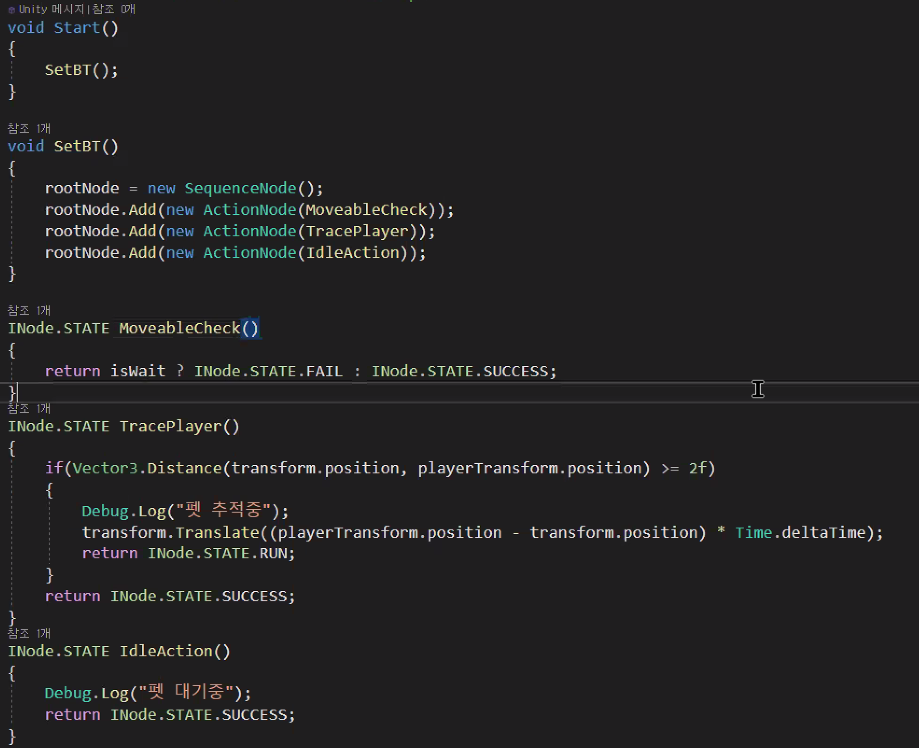
행동트리 : Behaviour Tree
BT라고도 한다.
BT는 논리적은 트리 구조를 사용하며 루트 노드에서 시작해 깊이 우선탐색(DFS)으로 자식 노드를 평가하고 평가 결과를 다시 부모 노드에게 반환하는 구조를 가진다.
각 노드는 3가지 상태중 하나를 가질 수 있으며 그 목록은 아래와 같다.
Failure(실패)
Running(동작 중)
Success(성공)
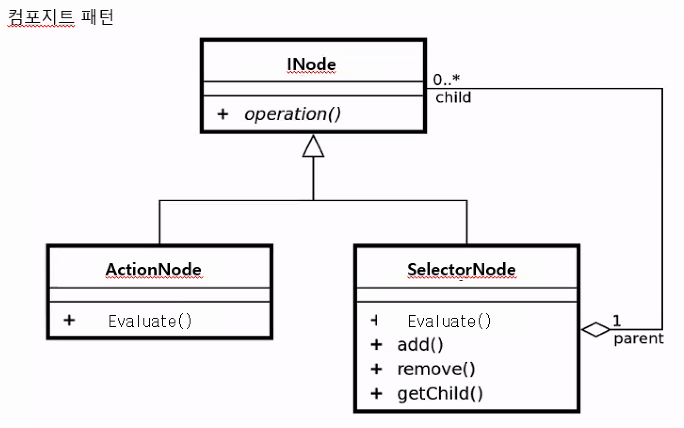
행동 트리 구조

행동트리 전체 예제 코드
using System.Collections;
using System.Collections.Generic;
using UnityEngine;
using System;
using Unity.VisualScripting;

public interface INode
{
    public enum STATE
    {
        RUN,
        SUCCESS,
        FAIL
    }

    public INode.STATE Evaluate();
}

//ActionNode는 항상 단말에 위치해야함으로, 자식이 있어선 안됨.
public class ActionNode : INode
{
    public Func<INode.STATE> action;

    public ActionNode(Func<INode.STATE> action)
    {
        this.action = action;
    }

    public INode.STATE  Evaluate()
    {
        if (action == null)
            return INode.STATE.FAIL;
        else
            return action();

    }
}


public class SelectorNode : INode
{

    List<INode> childs = null;
    public SelectorNode()
    {
        childs = new List<INode>();
    }

    public void Add(INode node)
    {
        childs.Add(node);
    }

    public INode.STATE Evaluate()
    {
        if (childs.Count <= 0)
            return INode.STATE.FAIL;

        foreach(INode childNode in childs)
        {
            INode.STATE nState = childNode.Evaluate();
            switch(nState)
            {
                case INode.STATE.RUN:
                    return INode.STATE.RUN;
                case INode.STATE.SUCCESS:
                    return INode.STATE.SUCCESS;
            }
        }
        return INode.STATE.FAIL;
    }
}

public class SequenceNode : INode
{
    List<INode> childs;
    public SequenceNode()
    {
        childs = new List<INode>();
    }
    public void Add(INode node)
    {
        childs.Add(node);
    }
    public INode.STATE Evaluate()
    {
        if (childs.Count <= 0)
            return INode.STATE.FAIL;

        foreach (INode childNode in childs)
        {
            switch(childNode.Evaluate())
            {
                case INode.STATE.RUN:
                    return INode.STATE.RUN;
                case INode.STATE.SUCCESS:
                    continue;
                case INode.STATE.FAIL:
                    return INode.STATE.FAIL;
            }
        }
        return INode.STATE.SUCCESS;
    }
}


public class Enemy : MonoBehaviour
{

    public int defectiveRange;
    public int attackableRange;
    SelectorNode rootNode;

    SequenceNode attackSequence;
    SequenceNode defectiveSequence;
    ActionNode idleAction;
    ActionNode returnAction;

    Transform target = null;
    Vector3 originPos;
    // Start is called before the first frame update
    void Start()
    {
        originPos = transform.position;
        SetBT();
    }

    public void SetBT()
    {
        //공격 시퀀스//
        attackSequence = new SequenceNode();
        attackSequence.Add(new ActionNode(CheckInAttackRange));
        attackSequence.Add(new ActionNode(Attack));

        //감지 시퀀스//
        defectiveSequence = new SequenceNode();
        defectiveSequence.Add(new ActionNode(CheckInDetectiveRange));
        defectiveSequence.Add(new ActionNode(TraceTarget));

        //귀환 액션//
        returnAction = new ActionNode(ReuturnOriginPos);

        //대기 액션//
        idleAction = new ActionNode(IdleAction);

        rootNode = new SelectorNode();
        rootNode.Add(attackSequence);
        rootNode.Add(defectiveSequence);
        rootNode.Add(returnAction);
        rootNode.Add(idleAction);
    }


    INode.STATE Attack()
    {
        Debug.Log("공격 중");
        return INode.STATE.RUN;
    }
    INode.STATE CheckInAttackRange()
    {
        if (target == null)
            return INode.STATE.FAIL;

        if(Vector3.Distance(transform.position,target.position) < attackableRange)
        {
            Debug.Log("공격 범위 감지 됨");
            return INode.STATE.SUCCESS;
        }

        return INode.STATE.FAIL;
    }

    INode.STATE TraceTarget()
    {
        if (Vector3.Distance(transform.position, target.position) >= 0.1f)
        {
            Debug.Log("추적 중");
            transform.forward = (target.position - transform.position).normalized;
            transform.Translate(Vector3.forward * Time.deltaTime, Space.Self);
            return INode.STATE.RUN;
        }
        else
            return INode.STATE.FAIL;
    }

    INode.STATE CheckInDetectiveRange()
    {
        Collider[] cols = Physics.OverlapSphere(transform.position, defectiveRange,1<<8);
        if(cols.Length > 0)
        {
            Debug.Log("탐지 됨");
            target = cols[0].transform;
            return INode.STATE.SUCCESS;
        }
        return INode.STATE.FAIL;
    }

    INode.STATE ReuturnOriginPos()
    {
        if(Vector3.Distance(transform.position,originPos) >= 0.1f)
        {
            Debug.Log("귀환 중");
            transform.forward = (originPos - transform.position).normalized;
            transform.Translate(Vector3.forward * Time.deltaTime,Space.Self);
            return INode.STATE.RUN;
        }
        else
            return INode.STATE.FAIL;
    }


    INode.STATE IdleAction()
    {
        Debug.Log("대기한다");
        return INode.STATE.RUN;
    }


    // Update is called once per frame
    void Update()
    {
        rootNode.Evaluate();
    }


    private void OnDrawGizmos()
    {
        Gizmos.color = Color.blue;
        Gizmos.DrawWireSphere(transform.position, defectiveRange);
        Gizmos.color = Color.red;
        Gizmos.DrawWireSphere (transform.position, attackableRange);
    }
}
반응형
반응형
'Unity C#' 카테고리의 다른 글
| Sort 하기 (0) | 2023.11.24 |
|---|---|
| 최소힙 (0) | 2023.11.23 |
| 유니티 C# tree(트리) (0) | 2023.11.21 |
| 제트카라 재 커스텀 (0) | 2023.11.17 |
| C# 딕셔너리 (1) | 2023.11.16 |
'Unity C#' Related Articles
more


