
Notice
Recent Posts
Recent Comments
Link
반응형
| 일 | 월 | 화 | 수 | 목 | 금 | 토 |
|---|---|---|---|---|---|---|
| 1 | 2 | 3 | 4 | |||
| 5 | 6 | 7 | 8 | 9 | 10 | 11 |
| 12 | 13 | 14 | 15 | 16 | 17 | 18 |
| 19 | 20 | 21 | 22 | 23 | 24 | 25 |
| 26 | 27 | 28 | 29 | 30 |
Tags
- 유니티 sparkmain(clone)
- sparkmain(clone) 무한생성
- sparkmain(clone)
- Simulation
- 행동트리
- 최소신장트리 mst
- Unity
- 너비탐색
- 깊이탐색
- raycast
- articulation body
- 오블완
- unity korea
- 유니티
- 드롭다운
- C#
- readonly
- unity sparkmain(clone)
- 크루스칼
- 습관형성 #직장인자기계발 #오공완
- dropdown
- 트리구조
- navisworks api
- 티스토리챌린지
- removeAll
- dfs
- 디지털트윈
- list clear
- 최단거리 알고리즘
- GetComponent
Archives
- Today
- Total
낑깡의 게임 프로그래밍 도전기
C# 딕셔너리 본문
반응형
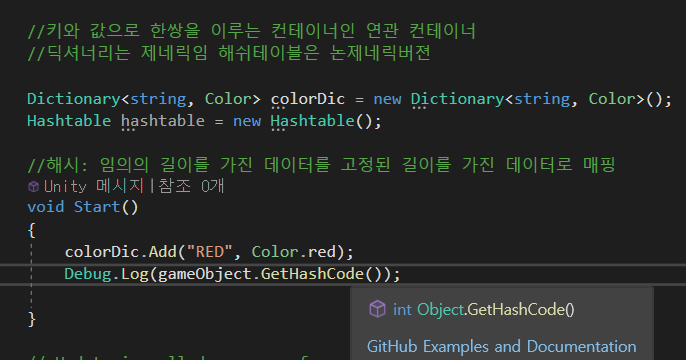


매싱을 해준다?
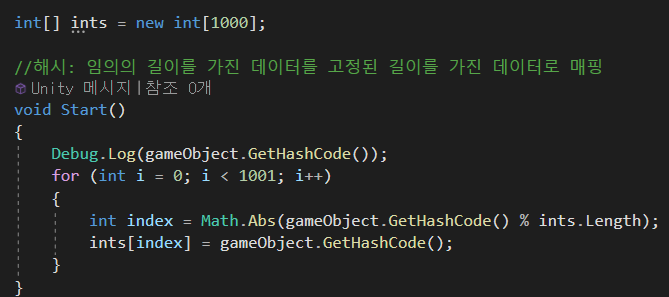

using System.Collections;
using System.Collections.Generic;
using UnityEngine;
using System;
using Unity.VisualScripting;

namespace TEST
{
    public class Dictionary<TKey, TValue>
    {
        private const int defaultCapacity = 1000;
        public struct Entry
        {
            public enum State
            {
                None, Using
            }

            public State state;
            public TKey key;
            public TValue value;
        }

        private Entry[] table;

        public TValue this[TKey key]
        {
            get
            {
                return GetValue(key);
            }
        }

        public Dictionary()
        {
            table = new Entry[defaultCapacity];
        }

        public void Add(TKey key, TValue value)
        {
            int index = Math.Abs(key.GetHashCode() % table.Length);
            table[index].key = key;
            table[index].value = value;
        }
        public TValue GetValue(TKey key)
        {
            int index = Math.Abs(key.GetHashCode() % table.Length);
            return table[index].value;
        }
    }

    public class GameManager : MonoBehaviour
    {

        //키와 값으로 한쌍을 이루는 컨테이너인 연관컨테이너
        //딕셔너리는 제네릭임 해쉬테이블은 논제네릭버젼
        //해시 : 임의의 길이를 가진 데이터를 고정된 길이를 가진 데이터로 매핑

        Dictionary<string, Color> colorDic;
        // Start is called before the first frame update
        void Start()
        {
            colorDic = new Dictionary<string, Color>();
            colorDic.Add("RED", Color.red);
            colorDic.Add("CUSTOM", new Color(1,0,0.5f));

            GetComponent<Renderer>().material.color = colorDic["RED"];
        }
    }

}
    public class Hashtable
    {
        private const int defaultCapacity = 1000;
        public struct Entry
        {
            public enum State
            {
                None, Using
            }

            public State state;
            public object key;
            public object value;
        }

        private Entry[] table;

        public object this[object key]
        {
            get
            {
                return GetValue(key);
            }
        }

        public Hashtable()
        {
            table = new Entry[defaultCapacity];
        }

        public void Add(object key, object value)
        {
            int index = Math.Abs(key.GetHashCode() % table.Length);
            table[index].key = key;
            table[index].value = value;
        }
        public object GetValue(object key)
        {
            int index = Math.Abs(key.GetHashCode() % table.Length);
            return table[index].value;
        }
    }
논 제네릭 버전의 해시테이블

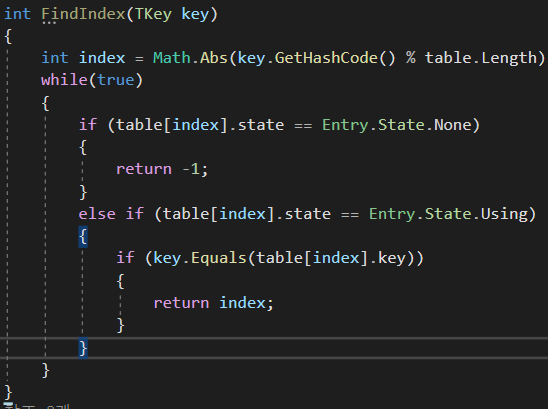


using System.Collections;
using System.Collections.Generic;
using UnityEngine;
using System;
using Unity.VisualScripting;

namespace TEST
{
    public class Dictionary<TKey, TValue>
    {
        private const int defaultCapacity = 1000;
        public struct Entry
        {
            public enum State
            {
                None, Using
            }

            public State state;
            public TKey key;
            public TValue value;
        }

        private Entry[] table;

        public TValue this[TKey key]
        {
            get
            {
                return GetValue(key);
            }
        }

        public Dictionary()
        {
            table = new Entry[defaultCapacity];
        }

        public bool ContainsKey(TKey key)
        {
            int index = FindIndex(key);
            return index != -1;
        }

        int FindIndex(TKey key)
        {
            int index = Math.Abs(key.GetHashCode() % table.Length);
            int collisionCount = 0;
            while (true)
            {
                if (table[index].state == Entry.State.None)
                {
                    return -1;
                }
                else if (table[index].state == Entry.State.Using)
                {
                    if (key.Equals(table[index].key))
                    {
                        return index;
                    }
                }

                index = (index + 1) % table.Length;
                collisionCount++;
                if (collisionCount >= table.Length)
                    throw new Exception("쫙돌았는데 모르겠음");

            }
        }
        public void Add(TKey key, TValue value)
        {
            int index = Math.Abs(key.GetHashCode() % table.Length);
            int collisionCount = 0;
            while(true)
            {
                if (table[index].state == Entry.State.Using)//빈집일 때
                    break;
                else //방이 사용중일 때
                {
                    index = (index + 1) % table.Length;
                    collisionCount++;
                    if (collisionCount >= table.Length)
                        throw new Exception("빈방없음");
                }
            }
            table[index].key = key;
            table[index].value = value;
            table[index].state = Entry.State.Using;
        }
        public TValue GetValue(TKey key)
        {
            int index = FindIndex(key);
            return table[index].value;
        }
    }


    public class GameManager : MonoBehaviour
    {

        //키와 값으로 한쌍을 이루는 컨테이너인 연관컨테이너
        //해시 : 임의의 길이를 가진 데이터를 고정된 길이를 가진 데이터로 매핑

        Dictionary<string, Color> colorDic;
        //Hashtable hashtable = new Hashtable();
        // Start is called before the first frame update
        void Start()
        {
            colorDic = new Dictionary<string, Color>();
            colorDic.Add("RED", Color.red);
            colorDic.Add("CUSTOM", new Color(1, 0, 0.5f));

            GetComponent<Renderer>().material.color = colorDic["RED"];
        }
    }

}
반응형
'Unity C#' 카테고리의 다른 글
| 유니티 C# tree(트리) (0) | 2023.11.21 |
|---|---|
| 제트카라 재 커스텀 (0) | 2023.11.17 |
| C# Queue(큐), 반복자 패턴, ?표 시리즈 (0) | 2023.11.15 |
| C# 상태머신 상태패턴 (0) | 2023.11.14 |
| C# 상태패턴 (0) | 2023.11.13 |
'Unity C#' Related Articles
more


